
Explain environment & PATH See why tools fail outside Terminal.
Compares the environments your processes actually receive to show exactly which difference changes command resolution between Terminal and GUI apps.
Free V1 · No account · No subscription · No paywall
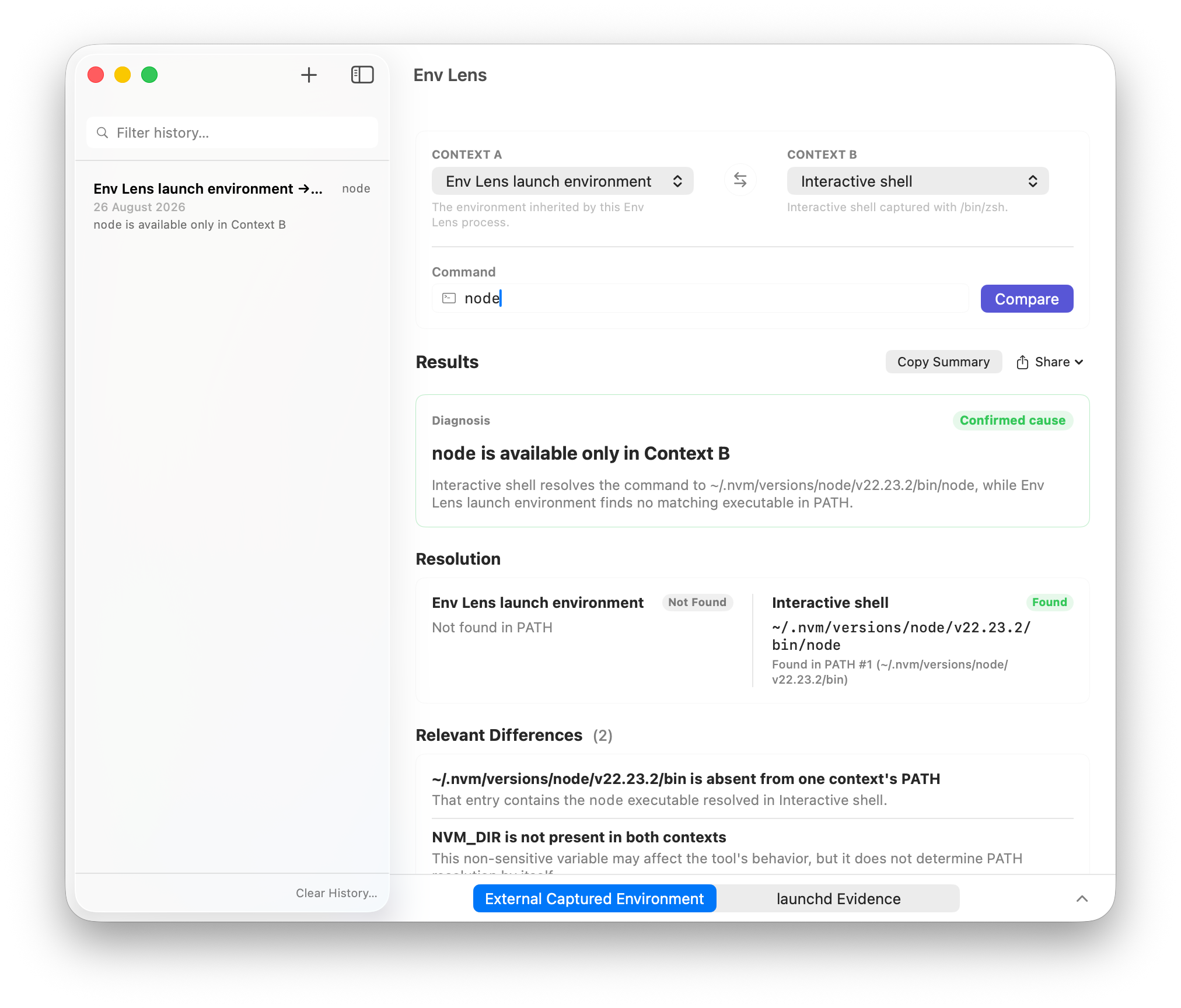
Execution context comparison
Identifies the exact differences between execution contexts before a tool fails.
Exact variable comparison
Finds missing, modified, and extra environment variables between your GUI apps, shells, and captured processes.
Command resolution tracing
Walks PATH in order to show which executable is selected, which entries are missing, and which alternatives are shadowed.
Sensitive-value protection
Detects credentials, tokens, and keys automatically. Compares values to confirm changes without revealing secret contents in the UI or reports.
GUI vs shell environment evidence
Compares what Finder and Dock apps inherit against user shell startup exports to explain runtime discrepancies.
Deep executable resolution
See how executables are found and selected across contexts without running the command.
Shadowed executable detection
Reveals earlier binaries in the PATH that override the version you intended to run (such as system vs Homebrew or version managers).
Symlink & filesystem checks
Validates file permissions and resolves symlink targets safely without executing candidate binaries.
PATH order & duplicates
Pinpoints reordered directories, duplicate entries, non-existent paths, and relative path hazards.
Evidence-based conclusions
Distinguishes observed facts and confirmed root causes from likely sources and context information.
How it works
1. Select two contexts
Choose any two environments: GUI app launch, login shell, interactive shell, or an external terminal capture.
2. Diagnose command resolution
Optionally enter a tool name (e.g. node, python, git) to trace resolution paths, shadowed candidates, and variable differences.
3. Review evidence & export
Inspect clear findings and recommendations, or export sanitized Markdown and JSON reports for your team.
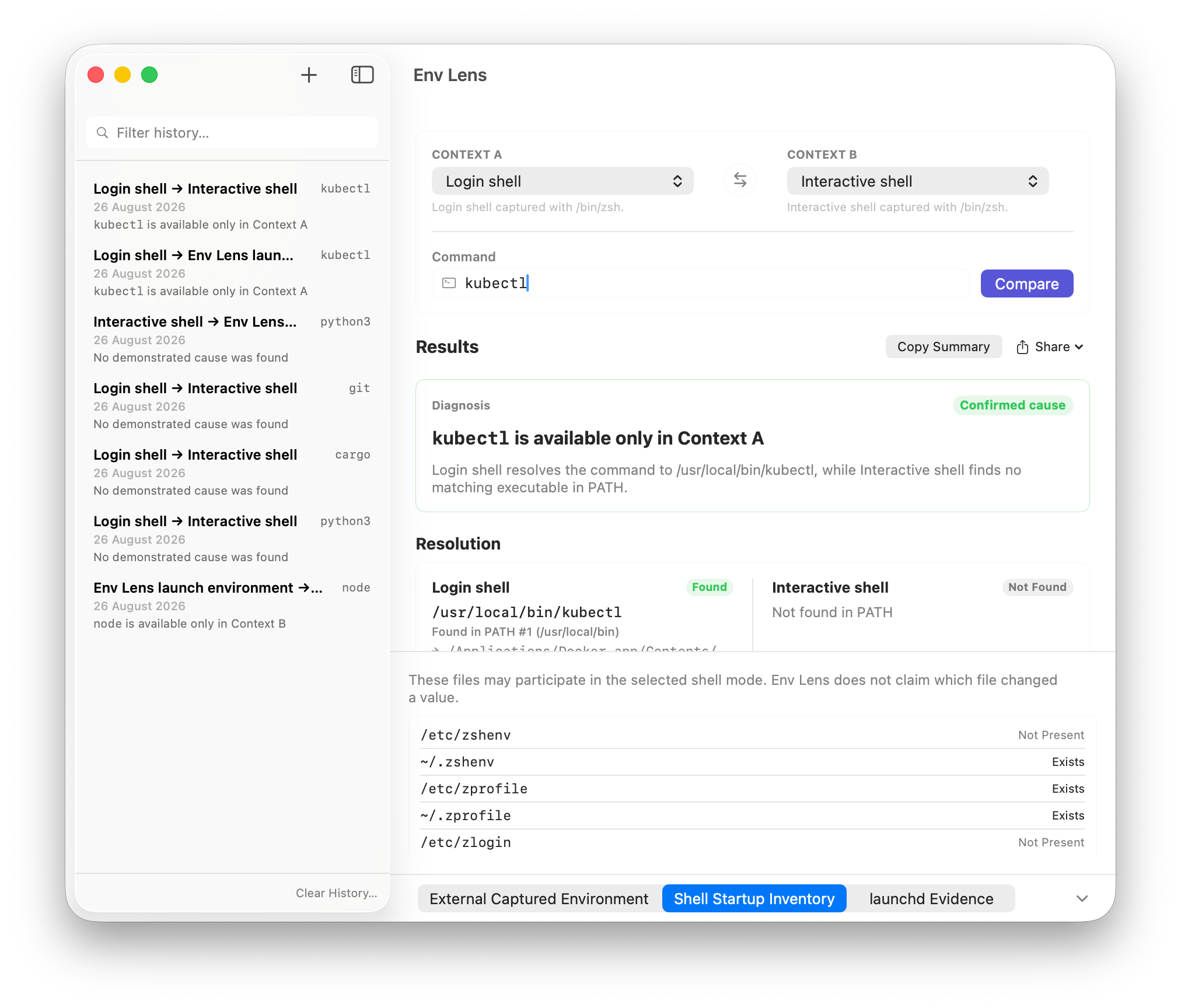
Private & read-only by design
Env Lens inspects and explains execution differences without modifying your system or transmitting data.
Strictly read-only
Never modifies your shell configuration (.zshrc, .bashrc), never edits launchd, and never changes your PATH.
Zero network calls
All analysis runs entirely on your Mac. No servers, no cloud services, no telemetry, and no tracking.
Sensitive-value protection
API keys, passwords, and private tokens are masked in the interface and never exported in reports.
Sanitized local history
Investigations are saved locally on your Mac with sensitive values stripped, ready to reopen or clear anytime.
Supported shells & execution contexts
Shells
Zsh (login, interactive) · Bash (login, interactive) · Custom shells via capture
Context sources
Observed GUI launch · Probed user shells · One-shot /usr/bin/env -0 captures
Shareable reports
Sanitized Markdown (.md) · Structured JSON (.json) · Clean clipboard summaries
Non-executing analysis
Inspects PATH candidates without executing commands; zero configuration changes.
Designed for developers, DevOps engineers, toolchain maintainers, and macOS power users.
Available in 7 languages: English, Spanish, French, German, Japanese, Simplified Chinese, and Traditional Chinese.
Completely free
Every V1 feature is included. No account, ads, paywall, or cloud dependency.
No account · No subscription · No paywall
- Dual-context workbench & command resolution tracing
- Zsh and Bash probes plus universal external capture
- Sensitive-value protection & sanitized local history
- Export sanitized Markdown and JSON reports
Free V1 · Every feature included
Frequently asked questions
Why does a tool work in Terminal but fail in a GUI app or IDE?
GUI applications launched from Finder, Dock, or Spotlight inherit the macOS launch environment, which often has a minimal default PATH (such as /usr/bin:/bin:/usr/sbin:/sbin). Terminal runs your shell startup configuration (.zprofile, .zshrc), which typically adds paths for Homebrew (/opt/homebrew/bin) or version managers (~/.nvm). Env Lens compares both contexts side by side to show you exactly which difference changes resolution.
Does Env Lens execute the commands I check?
Never. Env Lens evaluates resolution without executing your tools: it inspects filesystem metadata, checks executable permissions, and resolves symlinks without ever running candidate binaries.
How does Env Lens protect sensitive tokens and secrets?
Env Lens recognizes sensitive variable names and common secret patterns (such as credentials, API keys, passwords, and tokens). Their values are masked in the interface and excluded from exported reports, while still allowing change detection through session-keyed comparison.
Does Env Lens modify my shell profiles or system configuration?
No. Env Lens is strictly read-only. It never modifies .zshrc, .bash_profile, launchd, or your environment variables. It delivers the evidence and recommendations so you can make necessary adjustments yourself safely.
How does external capture work for IDEs and scripts?
Env Lens generates a one-shot capture command (using /usr/bin/env -0) that writes process environment data to a private temporary file. Paste and run this command in your IDE terminal or script, and Env Lens imports the exact exported environment immediately.
Is Env Lens free?
Yes. Env Lens V1 is completely free for macOS, with every feature included and no account, subscription, license key, or paywall.
Which macOS versions are supported?
Env Lens requires macOS 13.0 (Ventura) or later. It runs as a universal binary natively on both Apple Silicon and Intel Macs.