
Repair and verify CSV files Find issues. Repair safely.
Open or drop a CSV or delimited text file. CSV Doctor detects issues it can safely resolve, lets you review the proposed changes, and creates a repaired copy without modifying the original.
One-time purchase · No subscription · No in-app purchases
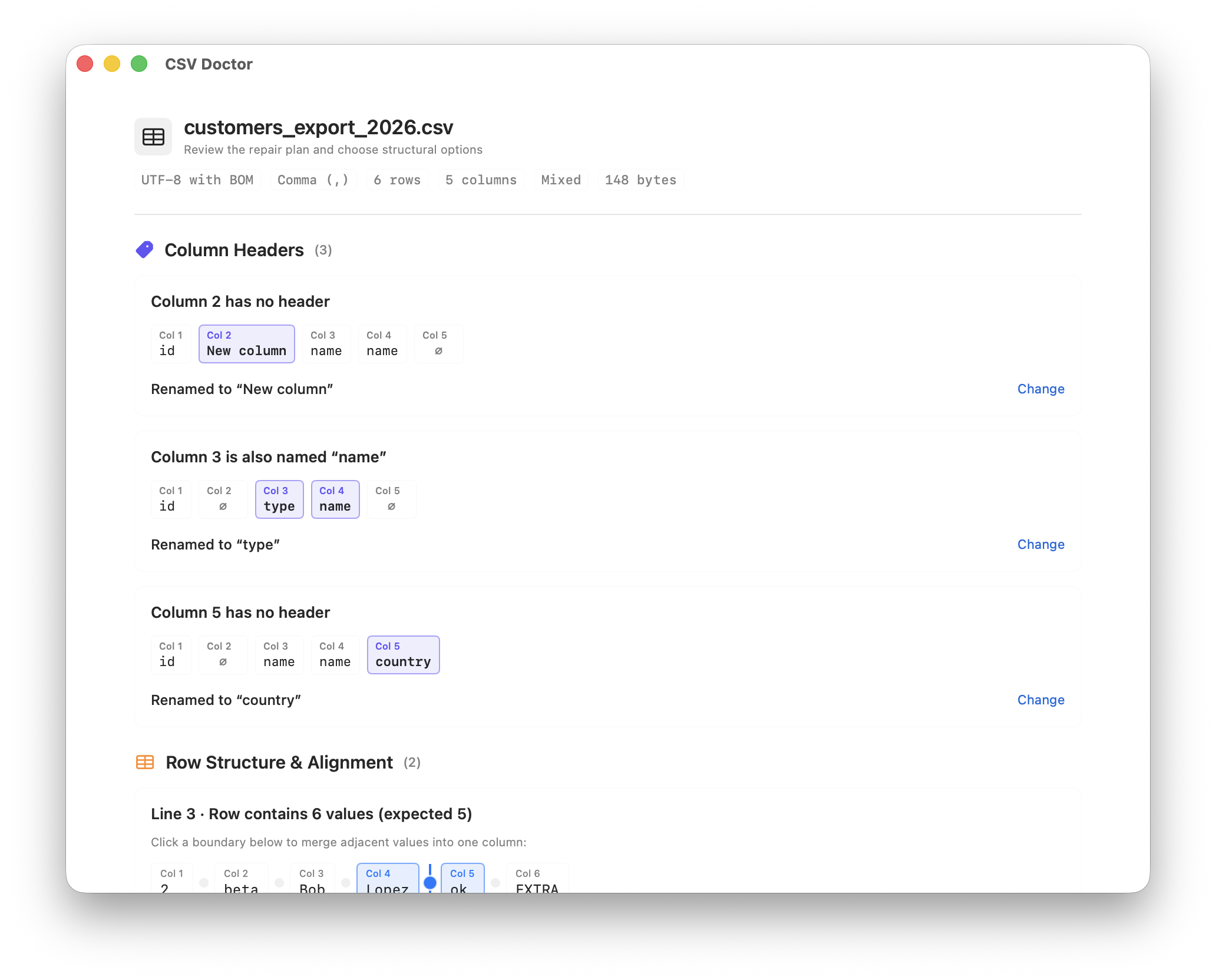
Deterministic diagnosis
Identifies structural and encoding issues locally on your Mac before any repairs are planned.
Inconsistent field counts
Flags rows containing too few or too many fields compared to the detected table structure.
Quoting and multiline issues
Proposes repairs only when a structurally safe solution is available. Ambiguous cases remain flagged for review.
Header integrity
Identifies missing column names and duplicate headers across the dataset.
Delimiter and encoding detection
Detects delimiters (comma, semicolon, tab, pipe) and normalizes UTF-8, UTF-16, and line endings.
Interactive guided repair
Review detected issues with previews. You stay in control of which repairs to apply.
Interactive boundary merge
Click adjacent field boundaries to merge split values caused by unescaped delimiters.
Empty field insertion
Align short rows by selecting the insertion point to restore consistent field count.
Header resolution
Assign column names to unnamed or duplicated headers before saving.
Quoting review
Review flagged quoting anomalies and apply conservative, structurally safe repairs.
How it works
1. Scan file locally
Open any CSV or delimited text file. CSV Doctor analyzes delimiters, encoding, and row structure locally on your Mac.
2. Review detected issues
Inspect flagged rows in the visual workbench. Review proposed changes and select the repairs to apply.
3. Save repaired copy
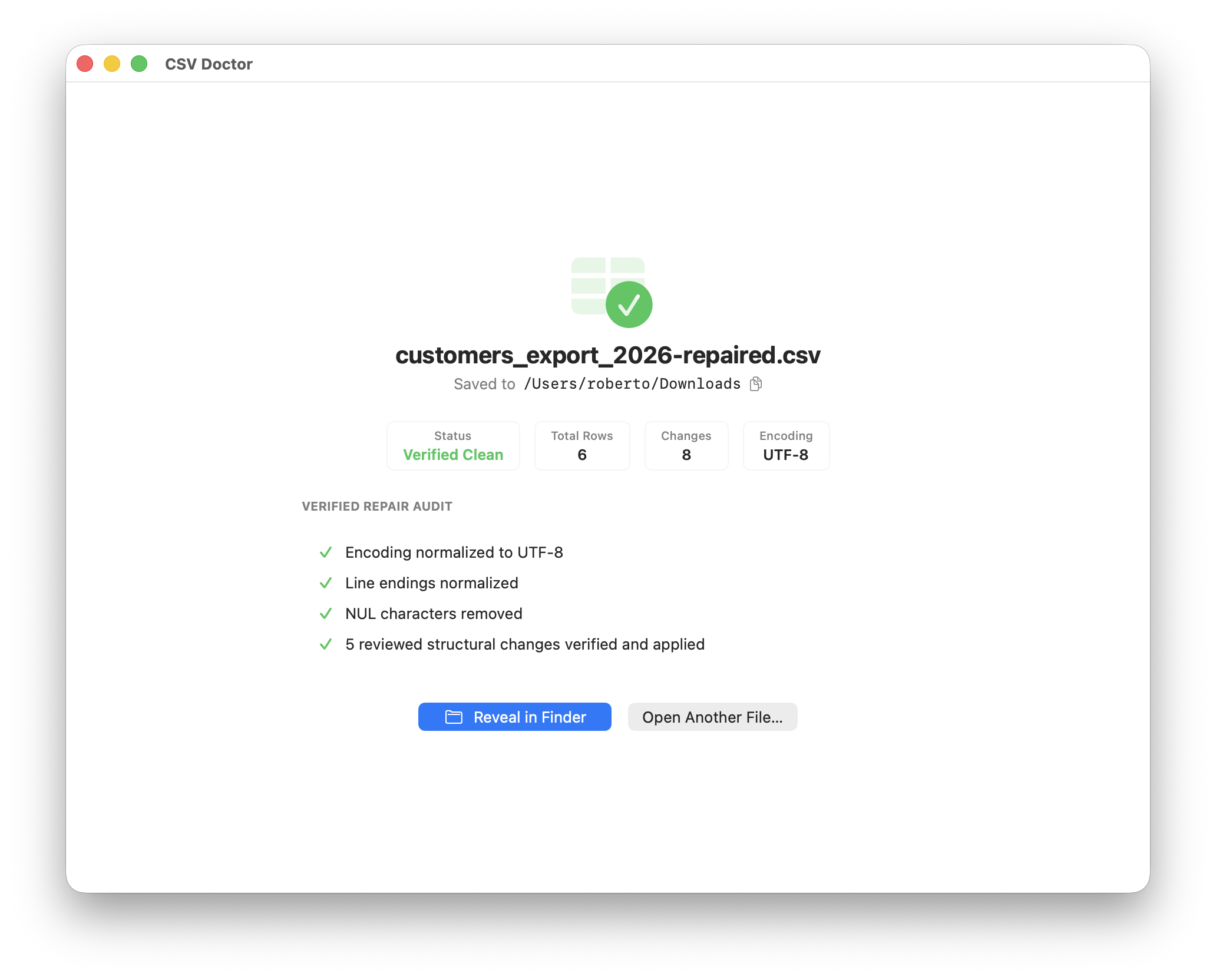
Generates and validates a repaired and verified copy in your chosen location. The original file is never modified.
Private by design
Your datasets, confidential customer exports, and records remain strictly on your Mac.
Local processing
All analysis and repairs are performed locally on your Mac.
Zero network calls
CSV Doctor does not connect to any servers, cloud services, or telemetry backends.
Originals never modified
Your original documents remain untouched. Repaired files are saved to a separate destination.
No subscriptions or tracking
Standard Mac App Store purchase. No account required, no tracking, and no subscriptions.
Supported formats and standards
Delimiters
Comma (,), Semicolon (;), Tab (\t), Pipe (|)
Encodings
UTF-8, UTF-8 with BOM, UTF-16 LE, UTF-16 BE
Line endings
LF (Unix / macOS), CRLF (Windows), CR (Legacy)
Safety engine
Deterministic local processing, safe writing, and verified output.
Optimized for exports from spreadsheets, databases, and business platforms.
Available in 7 languages: English, Spanish, French, German, Japanese, Simplified Chinese, and Traditional Chinese.
Transparent, one-time pricing
Direct upfront purchase. No subscriptions, no ads, and no in-app purchases.
Single upfront payment · No subscription · No in-app purchases
- Diagnostic scanning and row structure inspection
- Guided review and export of repaired and verified copies
- Safe, local processing on your Mac
- Native Apple Silicon and Intel universal binary
One-time purchase · No subscription · No in-app purchases
Frequently asked questions
How is CSV Doctor purchased?
CSV Doctor is a direct one-time purchase of €9.99 on the Mac App Store. There are no subscriptions, in-app purchases, or advertisements.
Does CSV Doctor overwrite my original file?
Never. CSV Doctor treats your original file as read-only. Repaired data is saved to a separate repaired and verified file in the location you choose.
How does CSV Doctor handle unescaped delimiters inside values?
CSV Doctor flags rows with extra fields. In the visual workbench, click the boundary between split fields to merge them into a single properly quoted cell.
How are quoting issues handled?
Proposes repairs only when a structurally safe solution is available. Ambiguous cases remain flagged for review so you can inspect the row before saving.
Are files uploaded to any cloud server?
No. Files are never uploaded and remain on your Mac. All analysis and repairs are performed locally on your Mac.
Is there a subscription?
No. CSV Doctor is a one-time purchase. No monthly or annual fees.
Which macOS versions are supported?
CSV Doctor supports macOS 13.0 or later, with native universal binaries for Apple Silicon and Intel Macs.