
Audit coding agent sessions See what the local records show
Context Trace reviews supported Codex and Claude Code session records on your Mac. See redacted sensitive findings, where they appeared in recorded model inputs, and where the evidence is incomplete.
One-time purchase · No subscription · No in-app purchases
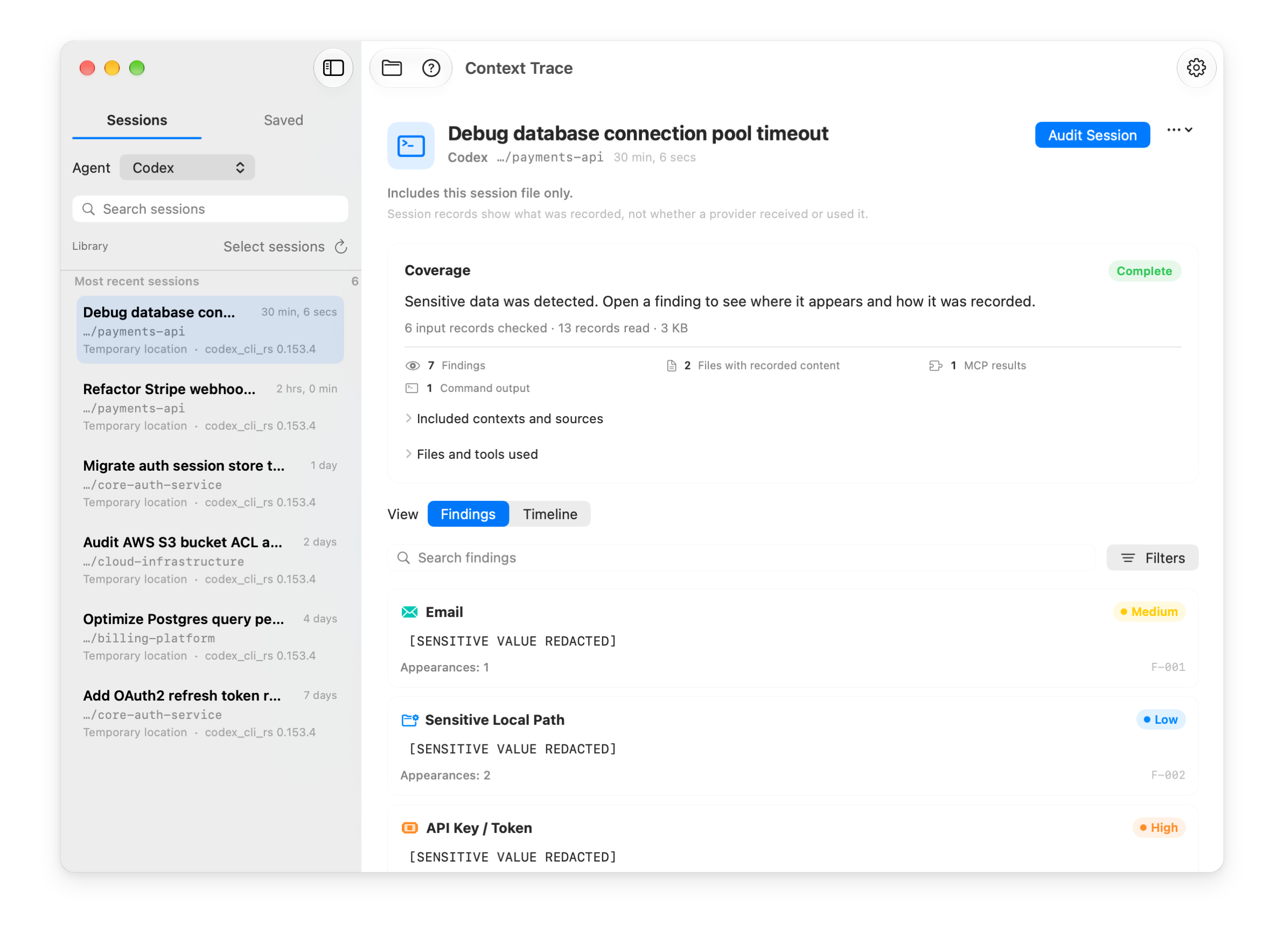
Review sensitive data in agent sessions
Local rules identify supported patterns and show the evidence behind each finding.
Sessions you choose
Connect a Codex or Claude Code folder to list its sessions. An audit starts only when you choose one.
Recorded model inputs
Check messages and tool results recorded as model input. A file merely present on disk is not counted.
Sensitive data patterns
Find supported patterns such as API keys, passwords, connection strings, and sensitive paths.
Origin and coverage
See the recorded source of a finding and any gaps that limit what the audit can establish.
See where a finding appeared
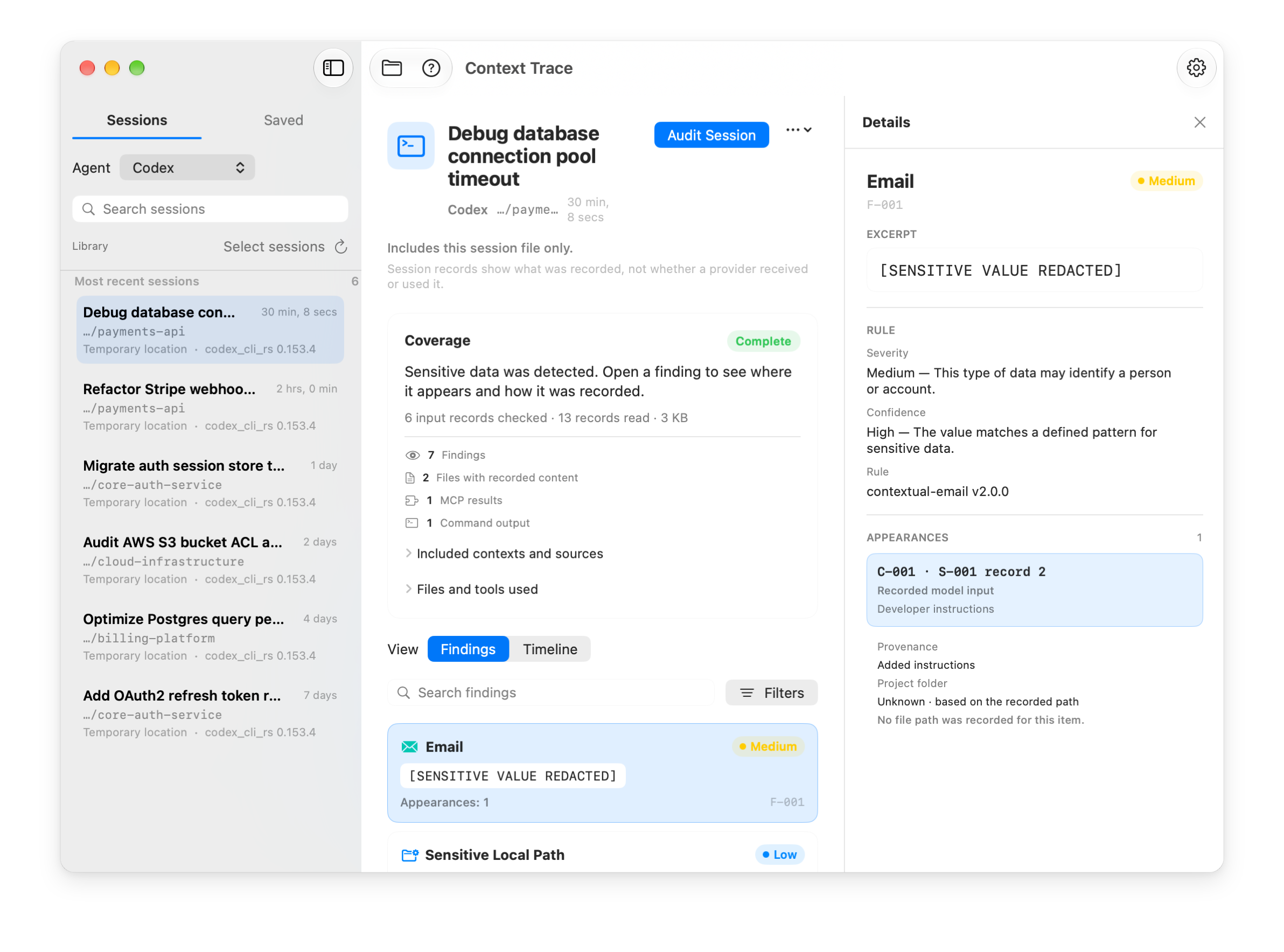
The audit links redacted findings to supported input events and shows gaps when evidence is missing.
Messages
See findings in recorded user or injected context messages.
Terminal output
See findings in shell output returned to the model, with a safe command label when available.
MCP results
See findings in supported tool results, with a sanitized tool name.
File content
See files whose content was recorded as model input. A file search alone does not qualify.
Review several sessions in one batch
Choose sessions across projects and review each result with its own coverage status.
1. Select Sessions
Select up to 100 sessions from the connected Codex and Claude Code locations.
2. Review the results
The app processes selected sessions one at a time and shows findings, coverage, and any gaps for each.
3. Export when needed
Export a sanitized Markdown or JSON report for a selected audit. Review it before sharing.
Your audit stays on your Mac
Context Trace analyzes authorized records locally without an account or remote analysis service.
Local analysis
The app does not transmit transcripts or reports for analysis and includes no app telemetry.
Read-Only Transcript Access
An audit does not change the original session records or your repository files.
Rules, not an AI service
Local deterministic rules identify supported sensitive patterns and recorded input events.
Encrypted Local History
Optional saved audit records use AES-256 encryption with a key in the macOS Keychain.
Simple, one-time pricing
€19.99 once, without a subscription or in-app purchases.
€9.99 launch price, paid once. Regular price €19.99.
One-time purchase on the Mac App Store
- Universal binary for Apple Silicon & Intel Macs
- Audit Codex CLI & Claude Code session logs
- Detect supported keys, tokens, credential-bearing URLs & sensitive paths
- Batch inspection across multiple projects
- Sanitized Markdown & JSON report export
- No subscription or in-app purchases
Requires macOS 13.0 or later · Universal binary
Frequently Asked Questions
Everything you need to know about Context Trace.
How does Context Trace discover my agent sessions?
When you grant access, Context Trace reads the local transcript directories created by coding agents (such as ~/.codex/sessions or ~/.claude/projects). It only inspects authorized folders and never modifies your original files.
Does Context Trace send my code or sessions to the cloud?
No. Context Trace analyzes authorized session records on your Mac and does not transmit them for analysis. This does not tell you what a coding agent sent to its provider.
Which AI agents are currently supported?
Context Trace currently provides native parsers and event correlation for Codex CLI and Claude Code, with support for multi-turn tool invocations, shell executions, and MCP tools.
What kinds of sensitive information does it detect?
Its local rules identify supported patterns such as API keys, authorization tokens, credential-bearing database URLs, and sensitive paths. They do not cover every possible secret.
How does it decide what was model-visible?
The audit counts supported messages and tool results recorded as model input. A file merely present on disk or a tool call without its result does not qualify. Coverage gaps show where records may be missing.
Can I export a report?
Yes. You can export a sanitized JSON or Markdown report for the selected audit. It includes coverage gaps and may still reveal sensitive context, so review it before sharing.
What are the system requirements?
Context Trace is a native universal binary supporting macOS 13.0 (Ventura) or later on both Apple Silicon (M1/M2/M3/M4) and Intel Macs.